
Overview of Website Details Page in Cloudusk
1 min read
Previously, we discussed the overview of site’s details on main Dashboard page. Now, we are going to take a look at features designed for site management in Cloudusk. This page is separate for each website and can be accessed by clicking on site’s name in the main dashboard page.
The page is divided in three main sections.First is top bar, second is sidebar, and last is details for the sidebar’s function area.
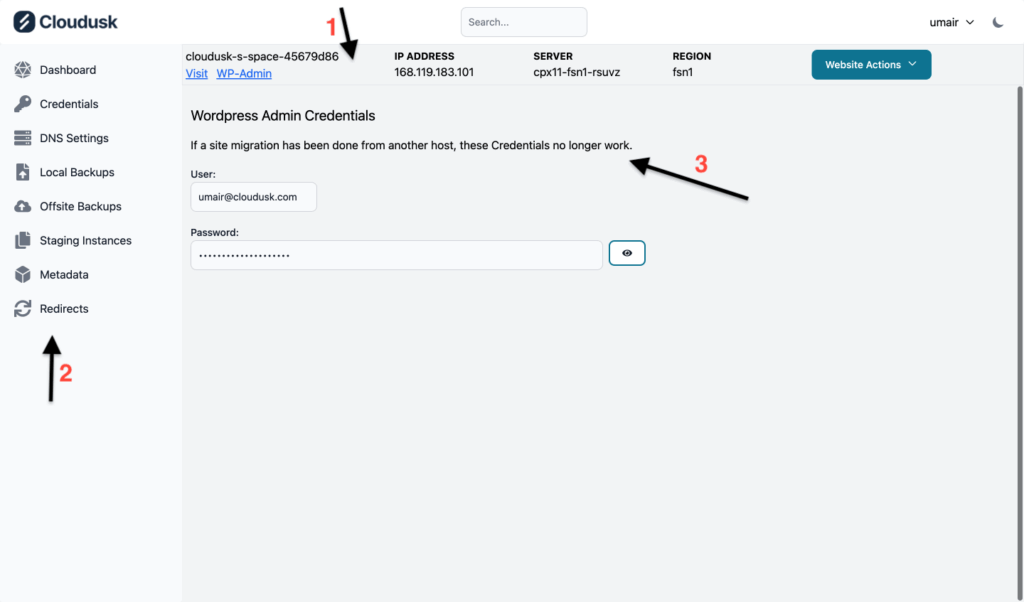
Top bar is divided into five sections where
- First section displays name of the website along with links to main URL and wp-admin area of WordPress.
- Second, third and fourth sections show server name, server IP, and server region respectively.
- Last section is a dropdown titled Website Actions. The only available action for now is Delete which is similar to what is displayed on main dashboard page.
Second area of site’s details page is Sidebar which houses main functions to manage your site on Cloudusk. The functions are as follows and their details are in respective links.
- Credentials
- DNS Settings
- Local Backups
- Offsite Backups
- Staging Instances/Clones
- Metadata
- Redirects
Third area of the page displays information relevant to the functionality in the side bar.


